1. 개요
Tiny Dominion 프로젝트에서
현재 카메라가 보고 있는 영역(Frustum)을 미니맵에 실시간으로 표시하고,
미니맵 클릭 시 해당 위치로 카메라를 이동시키는 기능을 구현했다.
핵심은 다음 두 가지다:
- 화면 → 월드 투영 (Deproject)
- 월드 → 미니맵 좌표 변환 (UV 매핑)
2. 카메라 프러스텀 렌더링
핵심 아이디어
- 화면의 4개 모서리를 월드로 변환
- 해당 Ray를 지면(Z=0)과 교차시켜 실제 위치 계산
- 월드 좌표를 미니맵 UV로 변환 후 선으로 연결
구현 코드
void ATWMiniMap::DrawCameraFrustum(UCanvas* Canvas, int32 Width, int32 Height)
{
    if (!Canvas || !GetWorld()) return;

    APlayerController* PC = GetWorld()->GetFirstPlayerController();
    if (!PC) return;

    FVector2D ScreenCorners[4] = {
        FVector2D(0, 0),
        FVector2D(Width, 0),
        FVector2D(Width, Height),
        FVector2D(0, Height)
    };

    TArray<FVector2D> MinimapPoints;

    for (int32 i = 0; i < 4; ++i)
    {
        FVector WorldLoc, WorldDir;

        if (PC->DeprojectScreenPositionToWorld(
            ScreenCorners[i].X,
            ScreenCorners[i].Y,
            WorldLoc,
            WorldDir))
        {
            if (FMath::IsNearlyZero(WorldDir.Z)) continue;

            float t = -WorldLoc.Z / WorldDir.Z;
            FVector GroundPos = WorldLoc + (WorldDir * t);

            FVector RelativePos = GroundPos - GetActorLocation();

            float U = (RelativePos.Y / CaptureWidth) + 0.5f;
            float V = (RelativePos.X / CaptureWidth) + 0.5f;

            MinimapPoints.Add(FVector2D(U * Width, V * Height));
        }
    }

    if (MinimapPoints.Num() == 4)
    {
        for (int32 i = 0; i < 4; ++i)
        {
            Canvas->K2_DrawLine(
                MinimapPoints[i],
                MinimapPoints[(i + 1) % 4],
                2.0f,
                FLinearColor::White
            );
        }
    }
}
핵심 포인트
- DeprojectScreenPositionToWorld 사용 (함수명 중요)
- Ray와 평면 교차로 실제 위치 계산
- WorldDir.Z == 0 방어 필요
- 미니맵 기준 좌표계로 변환 필요
3. 미니맵 클릭 → 월드 좌표 변환
핵심 아이디어
- UI 좌표 → UV(0~1)
- UV → 월드 상대 좌표
- 회전된 미니맵 기준으로 축 보정
구현 코드
FVector ATWMiniMap::GetWorldLocationFromTouch(
    FVector2D TouchPos,
    FVector2D WidgetSize)
{
    float U = TouchPos.X / WidgetSize.X;
    float V = TouchPos.Y / WidgetSize.Y;

    float RelativeX = (U - 0.5f) * CaptureWidth;
    float RelativeY = (V - 0.5f) * CaptureWidth;

    // -90도 회전 보정
    float WorldX = -RelativeY;
    float WorldY = RelativeX;

    FVector MapLocation = GetActorLocation();

    return FVector(
        MapLocation.X + WorldX,
        MapLocation.Y + WorldY,
        0.0f
    );
}
핵심 포인트
- UV 기준은 항상 (0.5, 0.5)가 중심
- CaptureWidth = 월드 범위 스케일
- 미니맵 회전 시 반드시 축 보정 필요
4. 머테리얼 처리
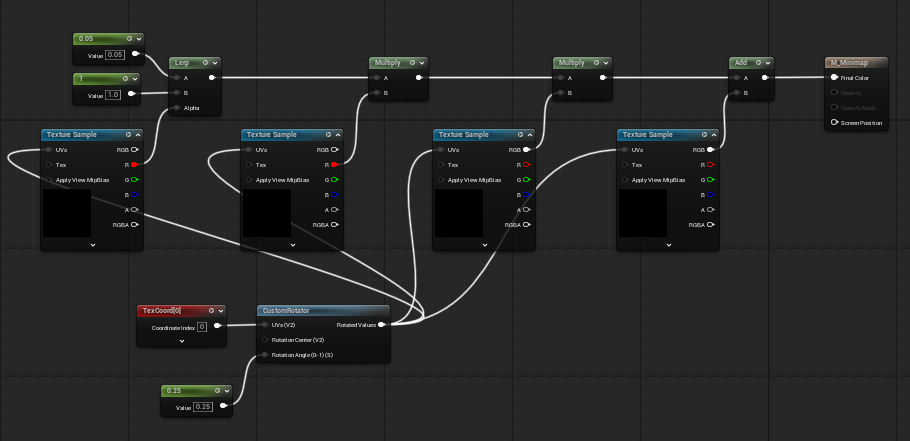
구성
- 지형 텍스처 + 프러스텀 RenderTarget 합성
- Add 연산으로 외곽선만 덧씌움
핵심 포인트
- CustomRotator(-90°)를 둘 다 동일하게 적용
- Multiply 사용 시 배경이 어두워짐 → 부적합
- Add 사용 시 선만 자연스럽게 합성됨
5. 위젯 처리
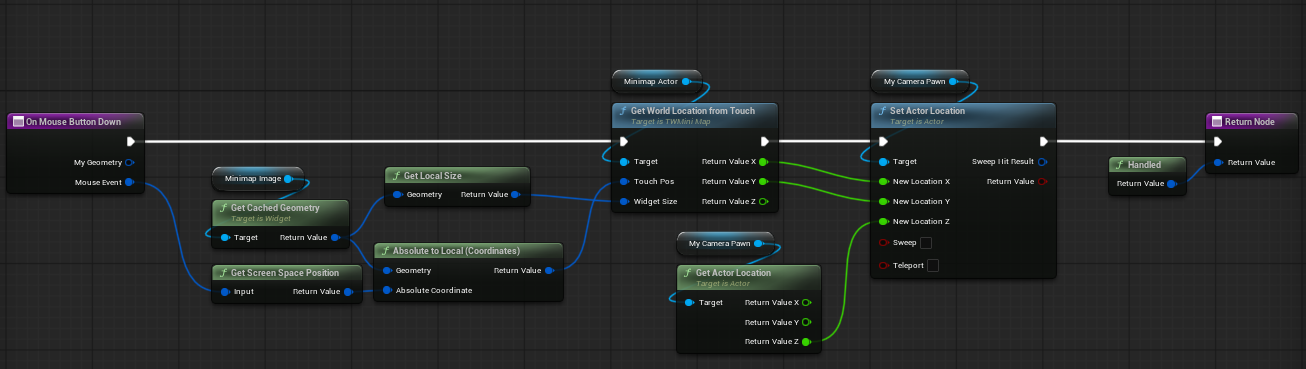
흐름
- OnMouseButtonDown
- Absolute → Local 좌표 변환
- C++ 함수 호출
- 카메라 이동
주의사항
- Screen 좌표 그대로 쓰면 틀어짐
- 반드시 Widget Local 좌표로 변환 필요
'내배캠 TIL' 카테고리의 다른 글
| [내배캠 TIL 260430] C++ 숫자 짝꿍 (빈도수 배열 최적화) (0) | 2026.04.30 |
|---|---|
| [내배캠 TIL 260417] Unreal RTS 영웅 스킬 구조 설계 (다형성 + 타이머 기반 판정) (0) | 2026.04.17 |
| TIL - Unreal Engine 미니맵 구현 (0) | 2026.04.13 |
| [내배캠 TIL 260406] Unreal Fog of War 서버연동 정리 (0) | 2026.04.06 |
| [ 내배캠 TIL 260403] Unreal RenderTarget 기반 Fog of War 구현 (0) | 2026.04.03 |